

Sniper Siege for PC
Are you a sharp-shooter?Updated February 21, 2026
Sniper Siege PC Details
| Category | Action |
| Author | VOODOO |
| Version | 3.76.1 |
| Size | 385.1 MB |
| What's New | Minor bug fixes and improvements. Install or update to the newest version to check it out! |
Sniper Siege for PC Screenshots
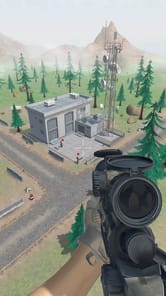
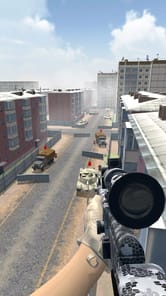
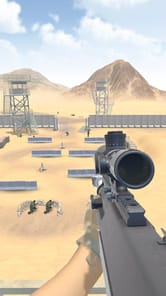
Discover the Thrill of Sniper Siege
Are you looking for an exciting and fun sniper adventure? Sniper Siege might be the perfect choice for you. It is an action-packed experience that pulls you right into the heart of the battle. Many find it to be one of the best sniping challenges available. It's an addicting and enjoyable journey from the very first shot.
A Top-Tier Sniping Experience
What makes Sniper Siege stand out? For starters, the controls feel great and are easy to use. This makes aiming and taking down targets smooth and satisfying. The guns also have a realistic feel, adding to the immersion. You will feel like a real sharpshooter as you line up your shots.
Master Your Aim
Sniper Siege has a neat feature that tells you exactly where your shot landed on an enemy. Sometimes you will get a direct hit, and other times you might just wound them. This feedback helps you improve your aim for the next target. It is a small detail that makes the action feel more real and engaging.
Gear Up for Victory
To succeed in Sniper Siege, you need more than just a good aim. You also need the right equipment. The game offers plenty of ways to build up your arsenal and become a powerful force.
Your Arsenal and Upgrades
Base battles can be quite challenging. The key to winning these tough fights is using the right guns and keeping them upgraded. Make sure to collect as many rewards as you can. These rewards are essential for getting the upgrades you need to defeat strong enemies and progress through the game.
The Legendary Bolter Rifle
If you get a chance, try to win the Bolter Rifle. This weapon is a true game-changer. It can be won in the Headshot competition and out-performs many other guns. It fires devastating explosive rounds. These rounds are powerful enough to blow up trucks, helicopters, and boats! The Bolter Rifle is also amazing in the Horde mode, where it sends zombies flying through the air.
Gameplay and Features
Sniper Siege is designed to keep you entertained with exciting challenges and cool features. It is a fabulous game that you can come back to again and again.
Exciting Game Modes
You can test your skills in different scenarios. From intense base battles to fending off waves of enemies in Horde mode, there is always a new challenge waiting. Planning your approach and having the right upgraded gear is crucial for victory.
Customizing Your Experience
The game includes a slow-motion effect for dramatic shots. While some find this feature exciting, you can play without always needing it. Sniper Siege also gives you the option to pay a small fee to remove forced ads for a smoother gameplay experience.
Frequently Asked Questions about Sniper Siege
Can I play Sniper Siege in landscape mode?
Currently, Sniper Siege is designed to be played in portrait mode on your device. This setup is optimized for the game's controls and layout.
How can I disable the slow-motion shot camera?
The close-up camera on certain shots is a dramatic feature. It is important to know that enemies can still attack you during this animation. You may want to check the in-game settings menu for any options to adjust or turn off this camera effect.
How do I add my country's flag to my profile?
Many players are interested in personalizing their profiles. For options like adding a country flag, it is best to explore the profile or account settings section within Sniper Siege to see what customization features are available.
How to Install Sniper Siege on PC
Below instructions allows you to download and install Sniper Siege app on Windows or MAC computer using an Android emulator. The process involves:
Download APK:Downloading the Sniper Siege APK file by choosing a version.
Install Android Emulator:There are a number of Android emulators the internet. Choose a emulator that works better with your PC. Now, download and install the Android emulator software.
Run the Emulator:Open the emulator you have just installed and configure the settings such as display, keywords, mouse etc.
Install Gene:Open the downloaded Sniper Siege APK file using the emulator, which will install Sniper Siege on Windows or MAC.